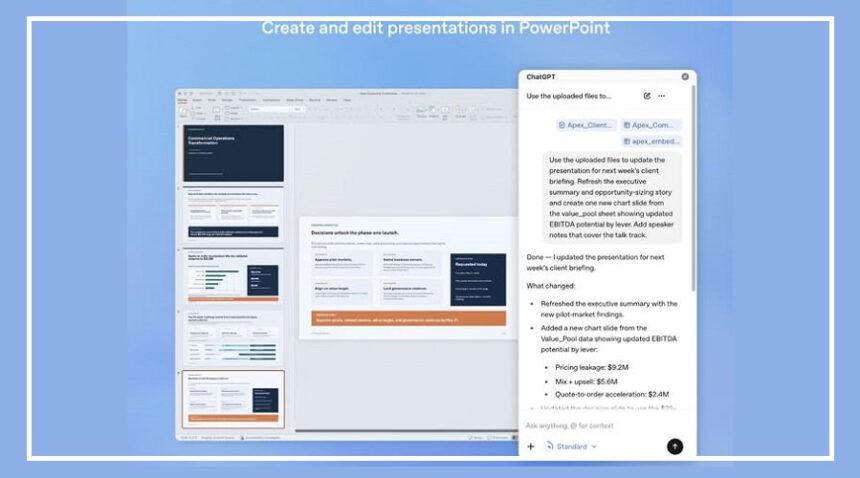
OpenAI is making ChatGPT more useful in everyday work tools by integrating it with Microsoft PowerPoint.
This new update allows users to create, edit, and improve presentations directly inside PowerPoint using simple text prompts.
The feature is currently available in beta for users across multiple plans, including ChatGPT Business, Enterprise, Edu, Free, Go, Plus, Pro, and other education-focused versions.
Instead of manually editing each slide, users can now ask ChatGPT to build presentations, rewrite content, and organize slides automatically.
What You Can Do with ChatGPT Inside PowerPoint
The new integration adds a ChatGPT sidebar directly inside PowerPoint, allowing users to work on presentations while interacting with AI in real time.
With this tool, users can:
Create full slide decks using text prompts
Turn documents, notes, images, and spreadsheets into presentations
Edit and rewrite slide titles and content
Reorder slides for better flow
Summarize long content into shorter slides
Improve overall presentation structure
It can also convert screenshots into editable slides, helping users reuse older presentation material quickly.
Another useful feature is that ChatGPT can analyze your presentation and suggest improvements in structure, clarity, and storytelling.
It can even predict questions your audience or executives may ask during a meeting.
Importantly, all slides created with ChatGPT remain fully editable inside PowerPoint.
Smarter Workflow with Connected Apps
OpenAI is also expanding ChatGPT’s role across productivity tools beyond PowerPoint.
The AI can now pull information from connected apps like Gmail, Outlook, and SharePoint to help users build presentations faster.
This reduces the need to manually copy and paste data from different sources, making the entire workflow smoother and more efficient.
With this move, OpenAI is also competing more directly with AI tools like Google Gemini and Claude, which already offer similar presentation features.
How to Use ChatGPT in PowerPoint
Users can activate ChatGPT inside Microsoft PowerPoint by following these steps:
Open Microsoft PowerPoint on your computer
Go to the “Home” tab and click on “Add-ins”
Search for ChatGPT in the add-ins store
Install the ChatGPT PowerPoint add-in
Open the ChatGPT panel from the PowerPoint toolbar
Sign in using your OpenAI account
Once logged in, users can start creating and editing presentations using simple prompts directly inside PowerPoint.
This integration aims to make presentation building faster, easier, and more intelligent by reducing manual effort and improving overall quality.